
Excel Basics
Microsoft Excel is a powerful spreadsheet application developed by Microsoft. It is widely used for storing, organizing, calculating, analyzing, and presenting data. Excel helps users perform simple calculations as well as complex data analysis using formulas, functions, charts, and various built-in tools.
Excel is commonly used in offices, businesses, schools, colleges, banks, and organizations for managing data efficiently.
What is Microsoft Excel?
Microsoft Excel is a spreadsheet software that allows users to:
- Store large amounts of data.
- Perform mathematical calculations.
- Create reports and invoices.
- Analyze business data.
- Create charts and graphs.
- Manage financial records.
- Track student, employee, and inventory information.
Real-World Uses of Excel
- Preparing salary sheets.
- Maintaining attendance records.
- Managing inventory and stock.
- Creating sales reports.
- Budget planning and expense tracking.
- Student result analysis.
- Business performance reporting.
Excel Interface Overview
When Microsoft Excel is opened, the main working screen is called the Excel Interface. Understanding the interface helps users work more efficiently and navigate Excel easily.
Components of Excel Interface
Excel Interface Overview
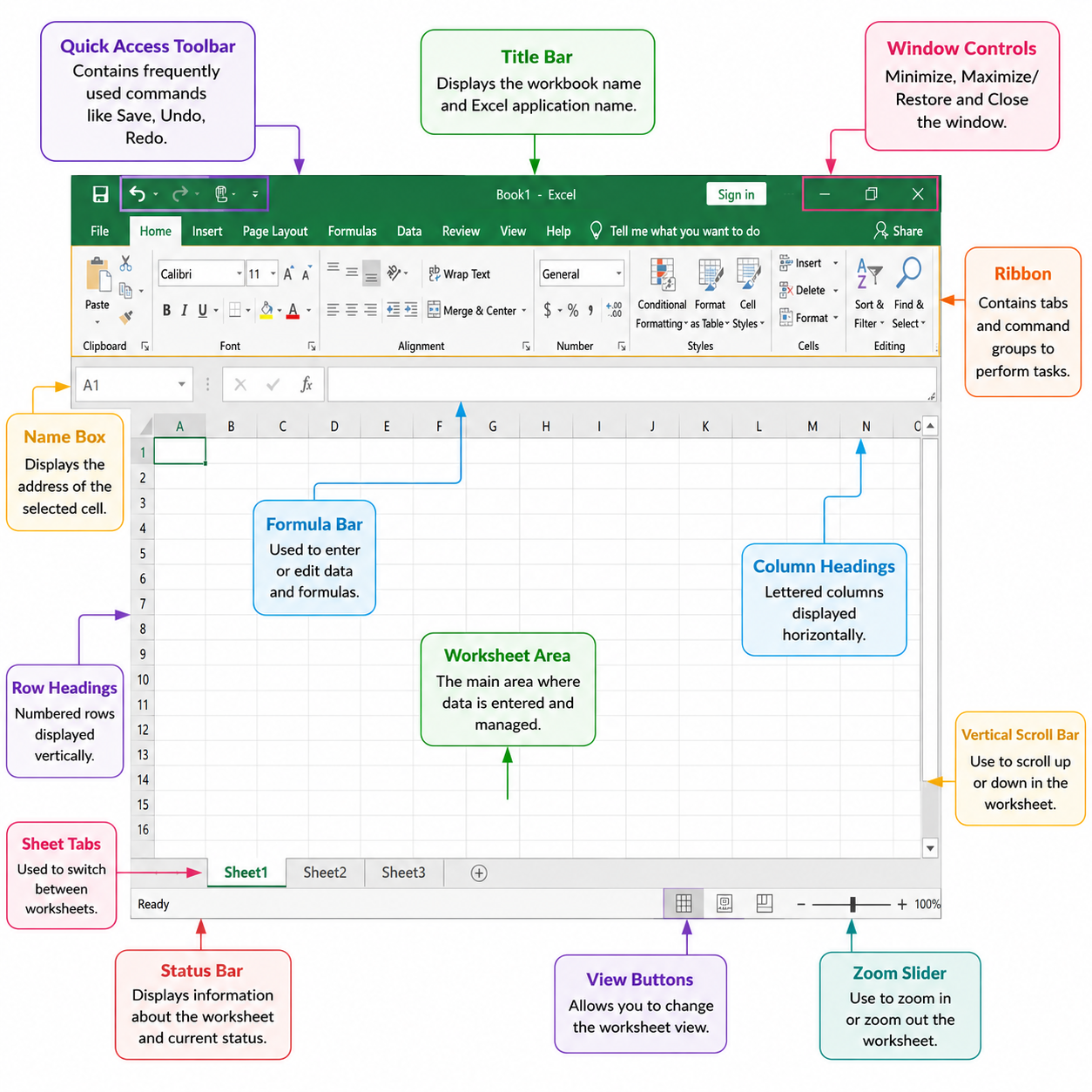
- Title Bar – Displays the workbook name and Excel application name.
- Quick Access Toolbar – Contains frequently used commands such as Save, Undo, and Redo.
- Ribbon – Contains tabs and command groups used to perform various tasks.
- Tabs – Home, Insert, Page Layout, Formulas, Data, Review, View, and more.
- Name Box – Displays the address of the selected cell.
- Formula Bar – Used to enter or edit data and formulas.
- Worksheet Area – The main area where data is entered.
- Row Headings – Numbered rows displayed vertically.
- Column Headings – Lettered columns displayed horizontally.
- Sheet Tabs – Used to switch between worksheets.
- Status Bar – Displays worksheet information and calculation results.
- Zoom Slider – Used to zoom in and zoom out of the worksheet.
Common Excel Tabs and Their Uses
| Tab | Purpose |
|---|---|
| Home | Formatting, editing, and basic functions. |
| Insert | Insert tables, charts, pictures, and shapes. |
| Page Layout | Page setup and printing options. |
| Formulas | Functions and formula tools. |
| Data | Sorting, filtering, and data analysis. |
| Review | Comments, spelling check, and protection. |
| View | Worksheet display and window settings. |
Shortcut Keys
| Shortcut Key | Function |
|---|---|
| Ctrl + N | Create a new workbook. |
| Ctrl + O | Open an existing workbook. |
| Ctrl + S | Save the workbook. |
| Ctrl + P | Print the workbook. |
| Ctrl + Z | Undo the last action. |
| Ctrl + Y | Redo the last action. |
| F2 | Edit the selected cell. |
Summary
Microsoft Excel is a powerful spreadsheet application used for data management, calculations, reporting, and analysis. Understanding the Excel interface, including the Ribbon, Formula Bar, Worksheet Area, Sheet Tabs, and other components, is the first step toward becoming proficient in Excel.
