
Introduction & Basics
0/8
Company & Master Setup
0/7
Account Heads || Ledger Create in Tallyprime
0/12
Inventory & Stock Management
0/9
Goods and Services Tax in Tally Prime
0/9
Understanding Voucher Types
0/21
Financial Statements & Reporting
0/6
Advance Tally
GST & Taxation
0/5
Advance Features (Optional / Professional Level)
0/7
✅ View chart of Account
📊 View Chart of Accounts in Tally Prime
The Chart of Accounts displays all groups and ledgers in an organized structure.
It helps you understand how accounts are classified.
Steps to View:
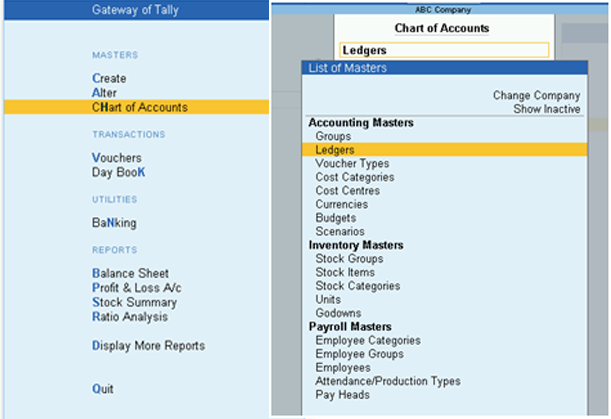
- Gateway of Tally → Chart of Accounts
- Select the Master Type (Group / Ledger)
Shortcut Method:
- Press Alt + G (Go To)
- Select Chart of Accounts
- Choose the Master Type and press Enter
![Set-Up Of Groups [Charts Of Accounts] in TallyPrime Accounting Software – TallyPrime Book (Tutorial : Printing Book & E-Book-PDF)- Learn Anytime & Anywhere !](https://tallyprimebook.com/wp-content/uploads/2021/02/32-TallyPrime-Book.jpg)
Note: You can press Enter on any ledger to alter its details.
