
Introduction & Basics
0/8
Company & Master Setup
0/7
Account Heads || Ledger Create in Tallyprime
0/12
Inventory & Stock Management
0/9
Goods and Services Tax in Tally Prime
0/9
Understanding Voucher Types
0/21
Financial Statements & Reporting
0/6
Advance Tally
GST & Taxation
0/5
Advance Features (Optional / Professional Level)
0/7
✅ Create a Stock Items
📦 Stock Item
A Stock Item in TallyPrime is used to record and maintain details of the goods or inventory that your business buys and sells. After creating Stock Items, you can record purchase and sales transactions and track stock quantity, rate, and value easily.
📋 Examples of Stock Items
👕 Men Wear
- Shirts
- Pants
👗 Women Wear
- Sarees
💡 Lighting
- LED Bulbs
- Tube Lights
🔌 Wiring
- Cables
- Switches
💻 Computer Accessories
- Keyboard
- Mouse
- Hard Disk
🧼 Bath Soap Brands
- PEARS
- SANTOOR
- FIAMA
- DOVE
- BIOTIQUE
- CINTHOL
- HIMALAYA
- MYSORE SANDAL
- MEDIMIX
- NEEM
- GODREJ
- PATANJALI (KESH KANTI)
- WIPRO
- PARK AVENUE
- SWATIK
- AYUR HERBAL
💇 Hair Oils
- KESH NIKHAR
- HAIR & CARE
- DABUR VATIKA
- BAJAJ
- NYLE
🛠 How to Create a Stock Item in TallyPrime
🪜 Step-by-Step Procedure
- Go to Gateway of Tally → Select Create →
Type or Select Stock Item → Press Enter.
Alternative: Press Alt + G →
Create Master → Select Stock Item. - Name & Alias:
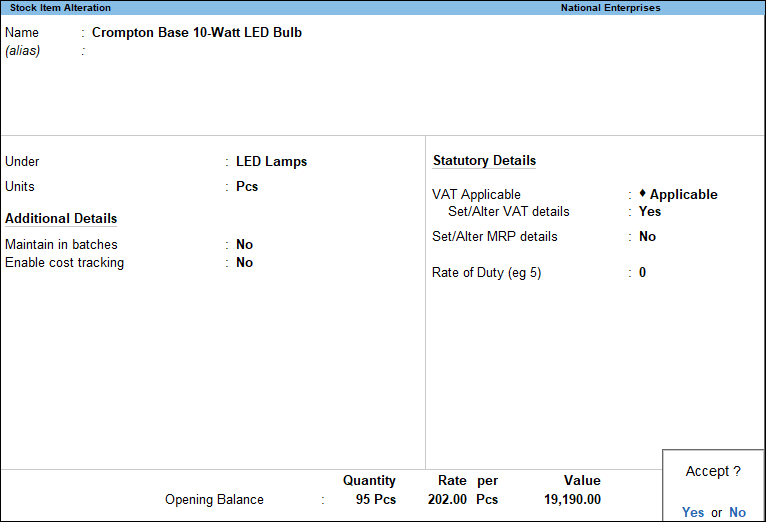
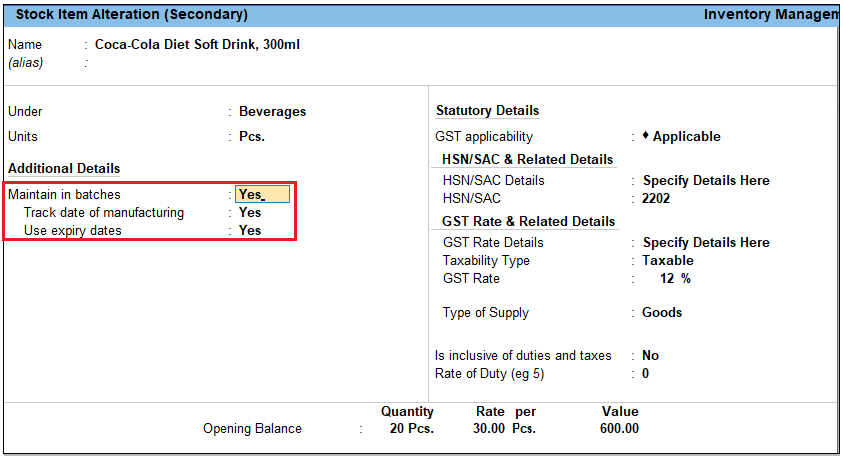
Enter the Stock Item name.
You can also give one or more Alias names if required. - Under:
Select Primary or the relevant Stock Group. - Units:
Select the Unit of Measurement (Nos, Kgs, Litres, Pcs, etc.). - Statutory Details:
Set the applicable Taxability option and GST details if required. - Opening Balance:
Enter the opening stock details as on the Beginning of Books:- Quantity: Enter total stock quantity.
- Rate: Enter rate per unit.
- Value: TallyPrime automatically calculates
(Quantity × Rate). You can edit the value if required.
- Press Ctrl + A to Accept and Save the Stock Item.
📌 Example
If you create a Stock Item:
- Name: PEARS Soap
- Under: Bath Soap
- Unit: Nos
- Opening Quantity: 100 Nos
- Rate: ₹45 per Nos
- Value: ₹4,500 (Auto Calculated)
🧠 Important Points
- Stock Item is mandatory to record Purchase and Sales of goods.
- Correct Unit selection is very important.
- GST details can be set at Item level if required.
- Opening balance helps in maintaining correct stock reports.
