
Payment Against Purchase Bill | Cash / Bank
After recording a purchase, the business must pay the supplier either
immediately or at a later date. The payment can be made through Cash, Bank, Cheque, or Online Transfer.
Meaning:
Payment Against Purchase refers to clearing the outstanding amount
of a purchase voucher by making payment to the supplier.
Payment Against Purchase refers to clearing the outstanding amount
of a purchase voucher by making payment to the supplier.
Types of Payment Against Purchase
- Instant Payment: Payment made immediately at the time of purchase (Cash selected directly in Purchase Voucher).
- Later Payment: Purchase recorded first using Supplier Ledger, payment recorded separately using Payment Voucher.
- Cash Payment: Amount paid from Cash-in-Hand.
- Bank Payment: Amount paid through Bank, Cheque, or Online Transfer.
mportant Note:
Always check available balance in Cash and Bank
before recording the payment voucher.
Always check available balance in Cash and Bank
before recording the payment voucher.
Payment Against Purchase Bills due by Cash
Transaction Details (01.04.2024)
- ₹45,000 – Purchase Bill Pending (Lenovo Ltd)
- ₹35,000 – Purchase Bill Pending (Lenovo Ltd)
- ₹45,000 – Purchase Bill Pending (Lenovo Ltd)
Total Cash Payment = ₹1,25,000
Steps to Record Cash Payment
- Open Payment Voucher:
Gateway of Tally → Vouchers → Press F5 (Payment)
Press F2 → Change Date to 01.04.2024 - Change Mode:
Press Ctrl+H → Select Single Entry Mode - Select Account:
In Account Field → Select Cash Ledger - Select Party:
Under Particulars → Select Lenovo Ltd Ledger - Enter Amount:
Enter ₹45,000 (repeat for other pending bills as required) - Bill-wise Adjustment:
Select Agst Ref
Choose pending purchase bill number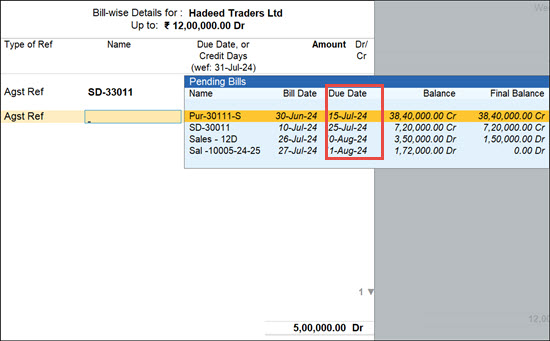
- Press Tab
- Enter Narration
- Press Ctrl+A to Save
Payment Against Purchase Bills due by UPI/NEFT/RTGS/IMPS [ Bank ]
Transaction Details (01.04.2024)
- ₹35,600 – Purchase Bill Pending (Lenovo Ltd)
Steps to Record Bank Payment
- Open Payment Voucher:
Gateway of Tally → Vouchers → Press F5
Press F2 → Change Date to 01.04.2024 - Change Mode:
Press Ctrl+H → Select Single Entry Mode - Select Bank Account:
In Account Field → Select Canara Bank Ledger - Select Party Ledger:
Under Particulars → Select Lenovo Ltd - Enter Amount:
Enter ₹35,600 - Bill-wise Details:
Select Agst Ref
Choose pending bill number
- Bank Allocation Screen:
Select Transaction Type (Default: Cheque)
Enter Cheque No / Transfer Details if required - Enter Narration
- Press Ctrl+A to Save
Conclusion
Recording payment against purchase ensures accurate supplier outstanding tracking and proper financial management. By using the Payment Voucher correctly
and adjusting it against the purchase reference, businesses can maintain clear and professional accounting records in TallyPrime.
