
Introduction & Basics
0/8
Company & Master Setup
0/7
Account Heads || Ledger Create in Tallyprime
0/12
Inventory & Stock Management
0/9
Goods and Services Tax in Tally Prime
0/9
Understanding Voucher Types
0/21
Financial Statements & Reporting
0/6
Advance Tally
GST & Taxation
0/5
Advance Features (Optional / Professional Level)
0/7
✅ Godown in TallyPrime
🏬 Godown (Location) in TallyPrime
A Godown refers to the place where stock items are stored.
It can be a:
- Warehouse
- Shop
- Showroom
You can create single or multiple Godowns in TallyPrime.
Godowns (Locations) help you manage stock in different storage places.
You can also create a hierarchy for:
- Shelves
- Bins
- Sections inside a warehouse
By default, TallyPrime maintains an internal Godown called
Main Location, where all stock is stored automatically.
🛠 Create Godowns / Locations
🪜 Step-by-Step Procedure
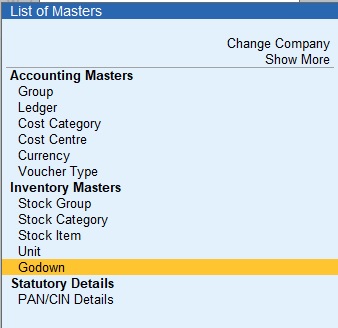
- Go to Gateway of Tally → Select Create →
Choose Godowns → Press Enter.Alternative: Press Alt + G (Go To) →
Create Master → Select Godowns. - When creating a Godown for the first time,
TallyPrime will prompt you to alter the internal godown
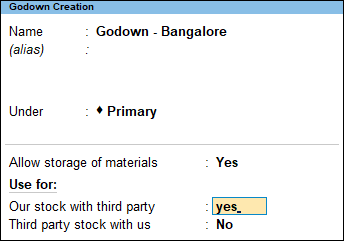
Main Location. - Name & Alias:
Enter the Godown name.
You can provide multiple aliases if required. - Under:
Select:- Primary – Creates the Godown at the same level as Main Location.
- Main Location – Makes Main Location the parent of the new Godown.
- Press F12 (Configure) if you want to change additional settings.
- Press Ctrl + A to Accept and Save.
📌 Example
- Main Location (Default)
- Warehouse – Under Primary
- Shop – Under Main Location
- Showroom – Under Main Location
✏️ Alter, Display & Delete Godowns
👁️ Display Godown
- Gateway of Tally → Chart of Accounts → Godowns → Select and View
✏️ Alter Godown
- Gateway of Tally → Alter → Select Godown → Make changes → Ctrl + A
🗑️ Delete Godown
- Gateway of Tally → Alter → Select Godown
- Press Alt + D to delete
- Select Yes to confirm
⚠️ Note: You cannot delete a Godown if it is used in transactions.
🎯 Benefits of Using Godowns
- Track stock location-wise
- Manage multiple branches or warehouses
- Better inventory control
- Accurate stock reporting
