
✅ How to Create a Sundry Debtors
Creating a Sundry Debtors/ Customer Name
Use this procedure to create a Customer Account for tracking sales and receivables.
👤 Customer Profile
-
Name: Pankaj Joshi
-
Address: Jayanagar, Gulbarga – 585101, Karnataka
-
Type: Consumer / Unregistered (Example)
🪜 Step-by-Step Procedure
1. Navigation
-
From Gateway of Tally, go to Create > Ledger.
-
Shortcut: Press Alt + G (Go To) → Create Master → Ledger.
2. Basic Configuration
-
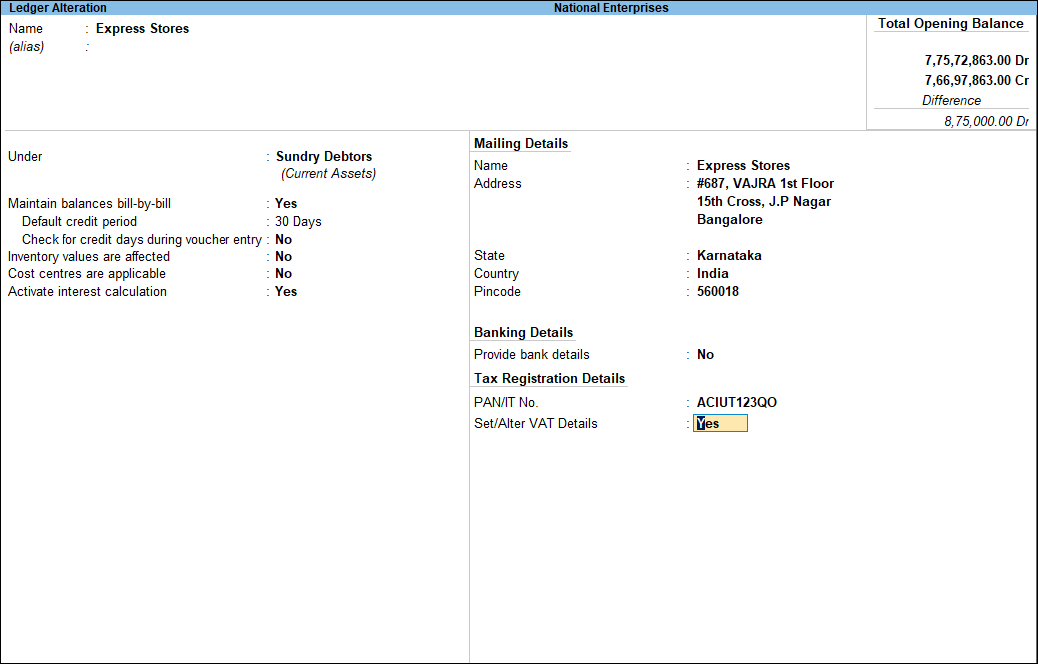
Name:
Pankaj Joshi -
Under (Group): Select Sundry Debtors.
Note: Sundry Debtors are classified as “Current Assets” because they represent money coming into your business.
3. Bill-by-Bill Details
-
Maintain balances bill-by-bill: Set to Yes.
-
This allows you to track exactly which invoice Mr. Joshi is paying for when he sends a check or transfer.
-
4. Mailing Details
Enter the customer’s contact information:
-
Address: Jayanagar, Gulbarga
-
State: Karnataka
-
PIN Code: 585101
5. Tax (GST) Details
Depending on the customer’s business status:
-
Registration Type: Select Unregistered/Consumer (if he is an individual) or Regular (if he has a GST number).
-
GSTIN/UIN: Leave blank if unregistered, or enter the 15-digit code if applicable.
6. Opening Balance
-
Leave as ₹0.00 for new customers.
-
Only enter an amount if the customer already owes you money from a previous accounting period.
7. Finalize and Save
-
Press Ctrl + A to Accept and save the ledger.
💡 Expert Tips for Debtors
-
Credit Limits: If you want to prevent selling more than a certain amount to a customer on credit, you can enable Credit Limits in F11 (Features). This prevents “bad debt” by stopping invoices if they exceed their limit.
-
Contact Details: Press F12 (Configure) while on the ledger screen to enable “Provide Contact Details.” This lets you save the customer’s phone number and email for sending digital invoices.
