
Introduction & Basics
0/8
Company & Master Setup
0/7
Account Heads || Ledger Create in Tallyprime
0/12
Inventory & Stock Management
0/9
Goods and Services Tax in Tally Prime
0/9
Understanding Voucher Types
0/21
Financial Statements & Reporting
0/6
Advance Tally
GST & Taxation
0/5
Advance Features (Optional / Professional Level)
0/7
Contra Vouchers | Day Book
The Day Book is a report that displays all transactions
recorded on a particular day, including Contra Vouchers, Payment, Receipt, Sales, Purchase, etc.
📌 How to View Contra Vouchers in Day Book
🔹 Method 1
- Press Alt + G (Go To)
- Type or Select Day Book
- Press Enter
🔹 Method 2
- Go to Gateway of Tally
- Select Day Book
📅 Changing the Date in Day Book
- Press F2 (Date)
- Set the required date
Important Note:
When you press F2, Tally automatically shows the
next day of the current date.
When you press F2, Tally automatically shows the
next day of the current date.
This helps users avoid manually entering the next business date.
You can still enter:
• Previous dates
• Future dates
• Any specific required date
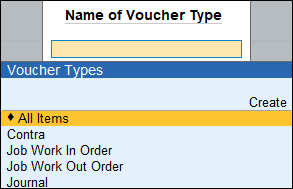
🔍 Viewing Only Contra Vouchers
- While in Day Book, press F4 (Voucher Type)
- Select Contra
- Press Enter
Now you will see only Contra vouchers recorded on that date.
Contra Vouchers | Register
Contra Register in TallyPrime
The Contra Register is used to track all fund transfer transactions
(Cash ↔ Bank or Bank ↔ Bank) recorded using Contra Vouchers.
By default, the Contra Register displays the number of Contra Vouchers
recorded month-wise.
📌 How to Open Contra Register
🔹 Method 1
- Press Alt + G (Go To)
- Type or Select Contra Register
- Press Enter
🔹 Method 2
- Go to Gateway of Tally
- Select Display More Reports
- Choose Account Books
- Select Contra Register

📅 View Quarterly Report
- Press F6 (Quarterly)
- The report will change from Month-wise to Quarter-wise view
📖 View Voucher Register
- Select the required Month or Quarter
- Press Enter
All Contra Vouchers recorded in that selected period
will be displayed in the Voucher Register Report.
will be displayed in the Voucher Register Report.
📊 What You Can Track in Contra Register
- Total number of Contra vouchers
- Month-wise or Quarter-wise summary
- Detailed voucher entries
- Fund transfer history between accounts
Important Note:
Contra Register helps you monitor internal fund transfers
and maintain proper control over Cash and Bank balances.
Contra Register helps you monitor internal fund transfers
and maintain proper control over Cash and Bank balances.
