
GST Tax Ledger Creation
To properly record GST transactions in TallyPrime, you must create separate
Tax Ledgers under Duties & Taxes for CGST and SGST
for both Purchase (Input) and Sales (Output).
🟢 CGST Ledger for Purchase (Input CGST)
Create the following ledgers:
- CGST IN @ 2.5%
- CGST IN @ 6%
- CGST IN @ 9%
- CGST IN @ 14%
🎯 Example: Creating CGST IN @ 9%
🔹 Step 1: Open Ledger Creation
Method 1: Gateway of Tally → Create → Ledger
OR
Method 2: Press Alt + G → Create Master → Ledger → Enter
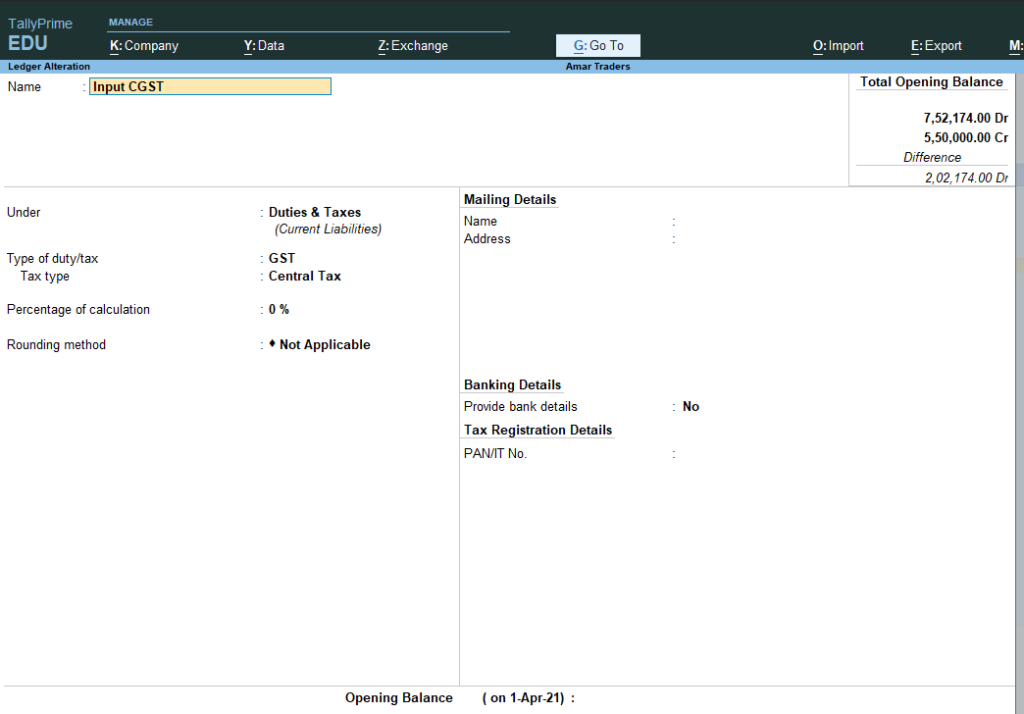
🔹 Step 2: Basic Details
- Name: CGST IN @ 9%
- Under: Duties & Taxes
🔹 Step 3: Tax Configuration
- Type of Duty/Tax: GST
- Tax Type: Central Tax
- Percentage of Calculation: 9%
- Rounding Method: Not Applicable
🔹 Step 4: Save
- Press Ctrl + A
🟢 SGST Ledger for Purchase (Input CGST)
Create the following ledgers:
- SGST IN @ 2.5%
- SGST IN @ 6%
- SGST IN @ 9%
- SGST IN @ 14%
🎯 Example: Creating SGST IN @ 9%
🔹 Basic Details
- Name: SGST IN @ 9%
- Under: Duties & Taxes
🔹 Tax Settings
- Type of Duty/Tax: GST
- Tax Type: State Tax
- Percentage of Calculation: 9%
- Rounding Method: Not Applicable
🔹 Save
- Press Ctrl + A

🟢 CGST Ledger for Sales (Output CGST)
Create:
- CGST OUT @ 2.5%
- CGST OUT @ 6%
- CGST OUT @ 9%
- CGST OUT @ 14%
🎯 Example: Creating CGST OUT @ 9%
🔹 Basic Details
- Name: CGST OUT @ 9%
- Under: Duties & Taxes
🔹 Tax Settings
- Type of Duty/Tax: GST
- Tax Type: Central Tax
- Percentage of Calculation: 9%
- Rounding Method: Not Applicable
🔹 Save
- Press Ctrl + A
🟢 SGST Ledger for Sales (Output CGST)
Create:
- SGST OUT @ 2.5%
- SGST OUT @ 6%
- SGST OUT @ 9%
- SGST OUT @ 14%
🎯 Example: Creating SGST OUT @ 9%
🔹 Basic Details
- Name: SGST OUT @ 9%
- Under: Duties & Taxes
🔹 Tax Settings
- Type of Duty/Tax: GST
- Tax Type: State Tax
- Percentage of Calculation: 9%
- Rounding Method: Not Applicable
🔹 Save
- Press Ctrl + A
Important Note:
• Purchase GST = Input Tax (Asset)
• Sales GST = Output Tax (Liability)
• Within State → CGST + SGST
• Net GST Payable = Output GST – Input GST
• Purchase GST = Input Tax (Asset)
• Sales GST = Output Tax (Liability)
• Within State → CGST + SGST
• Net GST Payable = Output GST – Input GST
