
Bill – Wise Details Screen
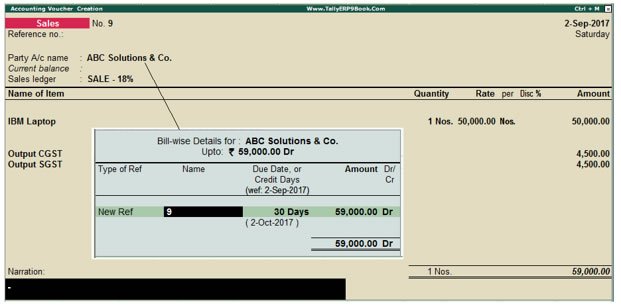
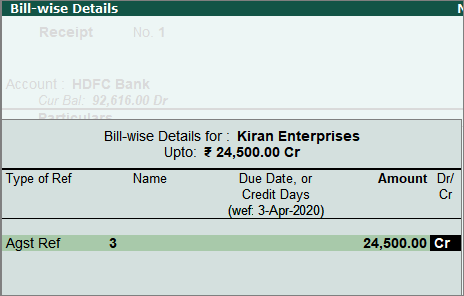
In TallyPrime, when you enter a Sales, Purchase, Payment, or Receipt Voucher, the Bill-wise Details screen appears if Bill-wise tracking is enabled for the party ledger.
This screen shows options like New Ref, Agst Ref (Against Reference), On Account, and Advance.
These options help you track invoices, payments, and outstanding balances.
Meaning of Bill-wise Options
- New Ref: Creates a new invoice or bill reference for the transaction.
- Agst Ref (Against Reference): Used to adjust payment against an existing bill.
- Advance: Records payment received or paid before the actual sale or purchase.
- On Account: Records payment without linking it to any specific bill.
1. Sales Voucher (Credit Sale)
Example: You sell goods to ABC Traders for ₹5,000.
- Type: New Ref
- Reference: INV-101
- Amount: ₹5,000
➡ A new bill is created and the customer must pay ₹5,000.
2. Purchase Voucher (Credit Purchase)
Example: You purchase goods from XYZ Suppliers for ₹3,000.
- Type: New Ref
- Reference: BILL-45
- Amount: ₹3,000
➡ A new payable bill is created for the supplier.
3. Payment Voucher
Example: You pay ₹3,000 to XYZ Suppliers for bill BILL-45.
- Type: Agst Ref
- Reference: BILL-45
- Amount: ₹3,000
➡ The supplier bill is cleared.
4. Receipt Voucher
Example: You receive ₹5,000 from ABC Traders for invoice INV-101.
- Type: Agst Ref
- Reference: INV-101
- Amount: ₹5,000
➡ The customer invoice is settled.
Other Bill-wise Options
Advance: Used when payment is received or paid before the invoice.
Example: Customer pays ₹2,000 advance before the sale.
On Account: Used when payment is received or paid but not linked to any specific bill.
